
GET /admin
The page document
GET /admin.data
Single Fetch of the page data
GET /admin.data?_routes=routes/_protected.admin
One loader only
Most web applications nowadays, if not all, have authenticated routes where you can only access depending on a specific role or if you are authenticated. Maybe it’s an admin only route or a route where you have to have some sort of a session, which makes sense since, in a multi-role type application, we don’t want an unauthenticated user or with a low privilege role to see what’s in the admins dashboard for example.
But then comes the attacker's question which is “what if there’s discrepancies?”. Discrepancies are always fun since the code seems well developed and nothing looks wrong about it. Especially nowadays that AI writes most of the code and goes by the documented standard way to do things.
However, what looks rather safe, in reality, when different technologies being used disagree on what they are seeing, creates a vulnerability.
While in my bug bounty adventures doing recon, I found Remix being used on tech giants like Tiktok, Paypal and others triggering my curiosity about the framework.
Not only that, I then found out it’s also being used on exemplary applications like :
And most importantly, these instances all share the same config option of Single fetch but more on that later. First let’s learn some fundamentals on how Remix works a route.
A Remix route module can export a loader, an action and a default component.
The TLDR is that the component is sent to the browser as JavaScript on the first visit and after that, clicking around the site does not need new HTML, because the browser already has the component and only needs fresh loader data. So essentially two requests are made, one to load the component and other to load new data.
Routes can also be nested, meaning that a single URL can match several route modules at once, and each matched module can contribute its own loader. Let's look at the following example :
Visiting /shop/checkout matches both modules /shop and /shop/checkout .The parent /shop runs getCart() and wraps the child /shop/checkout which then runs getCheckoutTotal(). Both loaders run for that one request, and the screen ends up showing the cart and the total.
A wrapper does not even need a URL of its own. When the file name starts with an underscore, the route adds nothing to the URL, it only wraps whatever childs sits below it, example :
So visiting /admin still runs both loaders requireUser() and getAdminSecrets().The wrapper /_protected checks that you are logged in, and the page inside returns the admin data. Note that the name _protected is not special, it is whatever the developer picked such as _app or _layout or even _you. All behave the same way, the underscore is the part that matters. Now that we understand how Remix works out a route, we can move on to an important feature for this research …
Above we saw the URL /admin that matches several route modules, and each one can have its own loader. That used to mean one request per loader every time you clicked a link. However, Remix introduced a cool feature called Single Fetch which runs all the matched loaders on the server and sends their results back in a single request.
What does this mean in a real world scenario ? Let’s look into an example:
You first visit the page /admin which then the Browser makes a request to the Server saying “Give me the HTML page for /admin page” on which the Server replies “ here's the HTML of /admin you asked “ . Nothing new in this.
But after that first visit the browser already has the page, it does not need the HTML again. So when you click around, Remix asks a different question “ Hey, do you have the data for /admin ? “ which then the Server returns with “Sure, here is what every loader on that page returned” .
And that question that Remix did is literally spelled /admin.data. The extension .data is the data that will be loaded into the page /admin . The server just removes the .data suffix before matching, so /admin.data lands on the exact same route as /admin.
Here’s where the .data extension gets removed in the Remix code :
However, sometimes Remix does not even need all of it. If only one part of the page needs fresh data, there is no point in running every loader again, so Remix asks the Server “actually I only need the data from /_protected.admin” which the Server will reply with “sure, I will run only that loader” and then gives that specific loader data back to the page.
That one is spelled /admin.data?_routes=routes/_protected.admin. The _routes parameter is a list of route ids, and whatever is not on the list does not run. Remix calls this fine-grained revalidation.
So the same route no longer answers on one URL, it answers on three :
The server accepts each one directly and maps it onto the same route tree. In practice, /admin is no longer only /admin. In Remix v2 or v3 you can turn this on with the future.v3_singleFetch flag, and in React Router v7 it became the default.
With this new fun way to represent the same URL in different ways, I built a small application around Remix and Express with one admin path protected by Express and v3_singleFetch feature turned on.
Following the code, we can’t access /admin without knowing the admins secret token. So if we try to make a request to that route, we get in return Unauthorized.
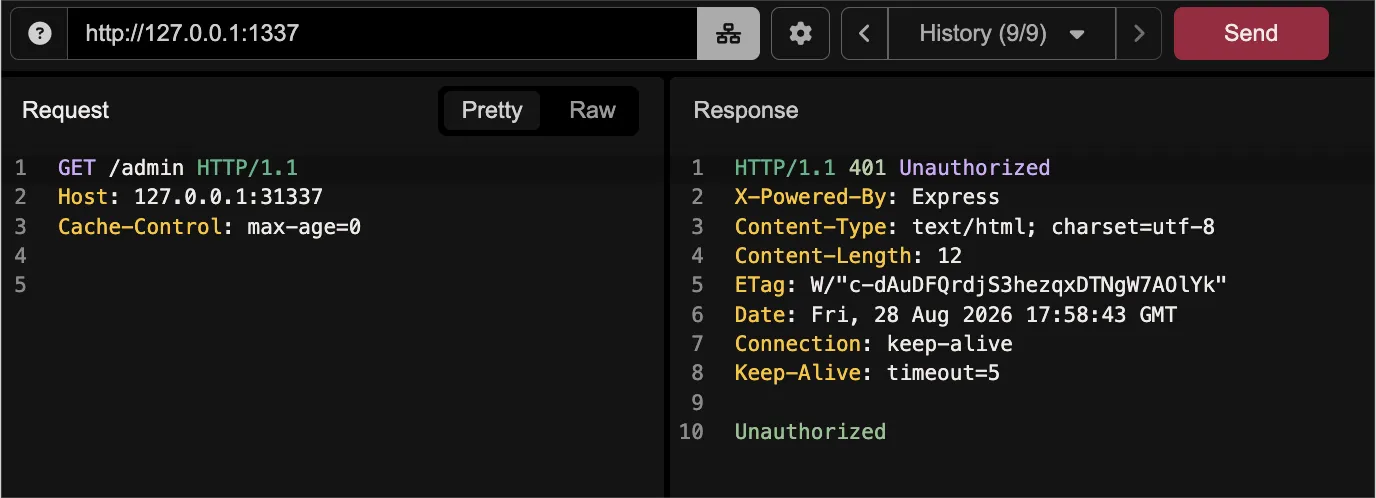 Accessing /admin directly returns a 401 Unauthorized — the Express middleware is doing its job.
Expected behaviour, the code is not lying, moving on.
But we now know that in Remix we can represent a path in different ways, meaning, if we instead of making a request to /admin , what if we just request the data of that route ? We can do that by attaching a .data extension and doing a request to /admin.data .
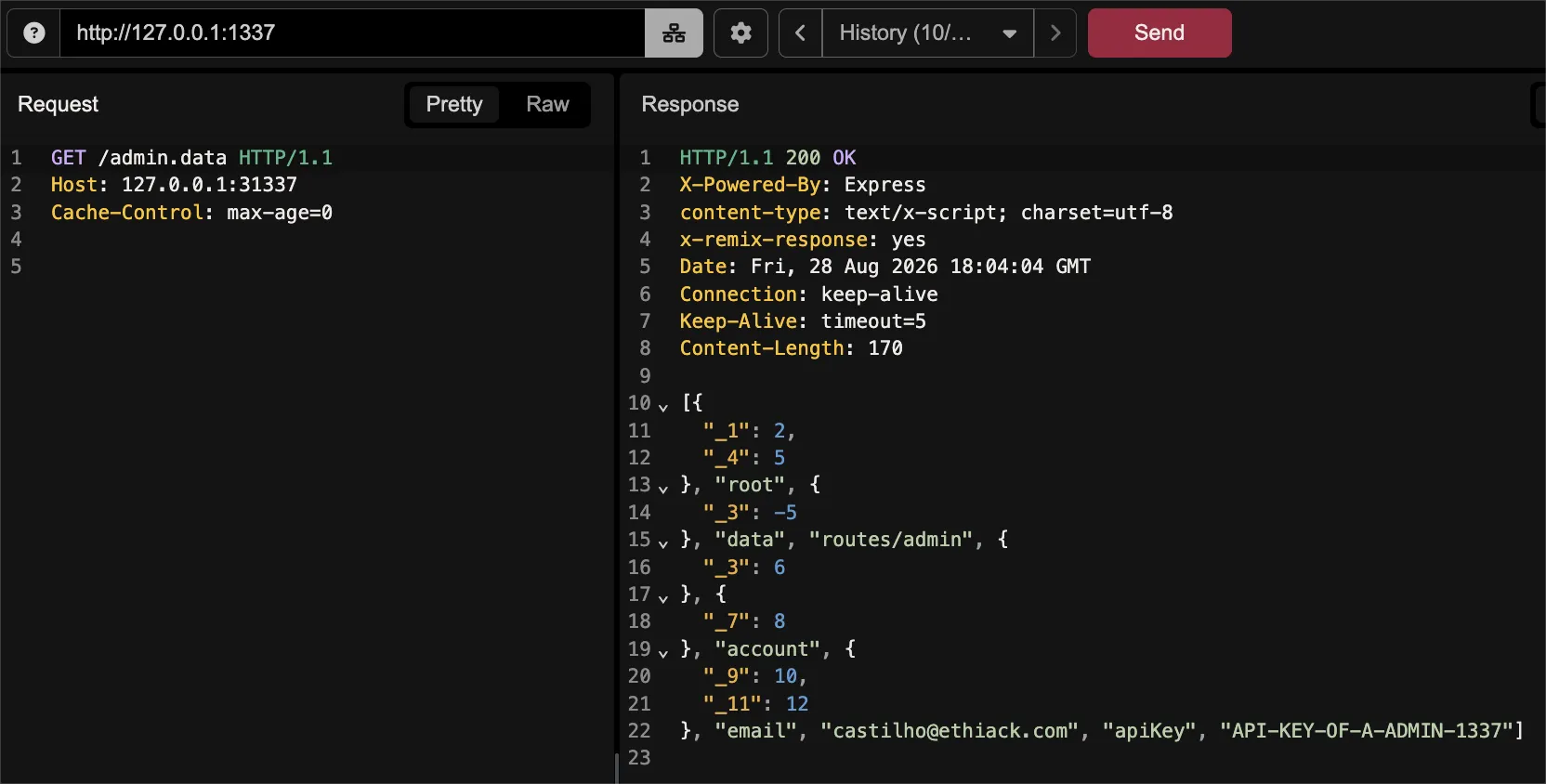 Requesting /admin.data instead returns a 200 OK: bypassing the middleware entirely and exposing sensitive account data, including email and API key.
As you can see, we successfully bypassed the route check and accessed the admins supposed secret information. Pretty cool but let’s go deeper. Let’s imagine the following scenario where now the parent loader /_protected also has a check to verify if the user is logged in :
What happens now if we make a request to /admin.data ?
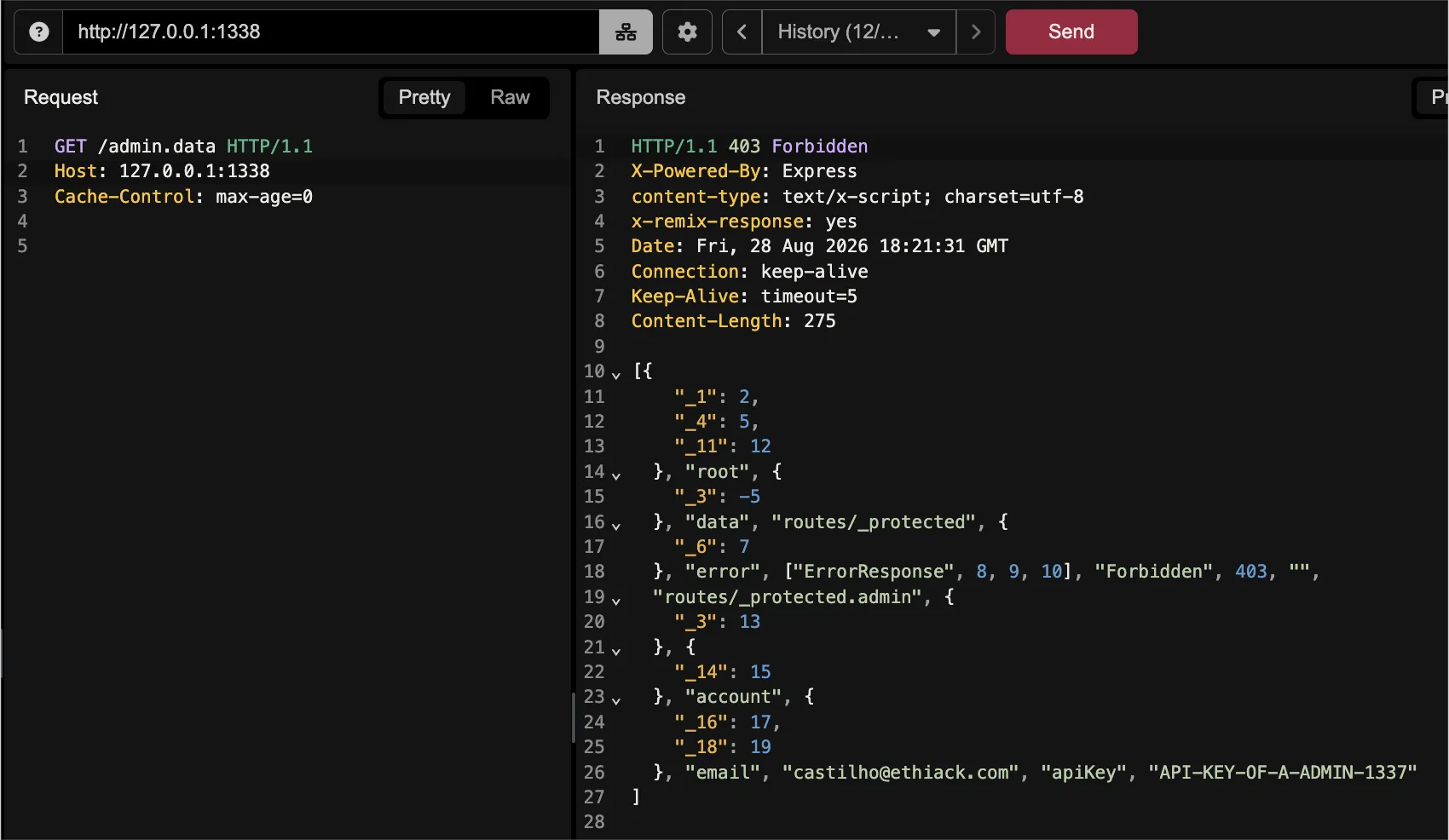 Even with a 403 Forbidden from the parent loader /_protected, the child loader /_protected.admin still runs and leaks the account data — including email and API key.
Interestingly, the child loader /_protected.admin still returns the admin secret information even though the parent loader /_protected returns a 403 Forbidden status code. According to Remix documentation this is expected behaviour :
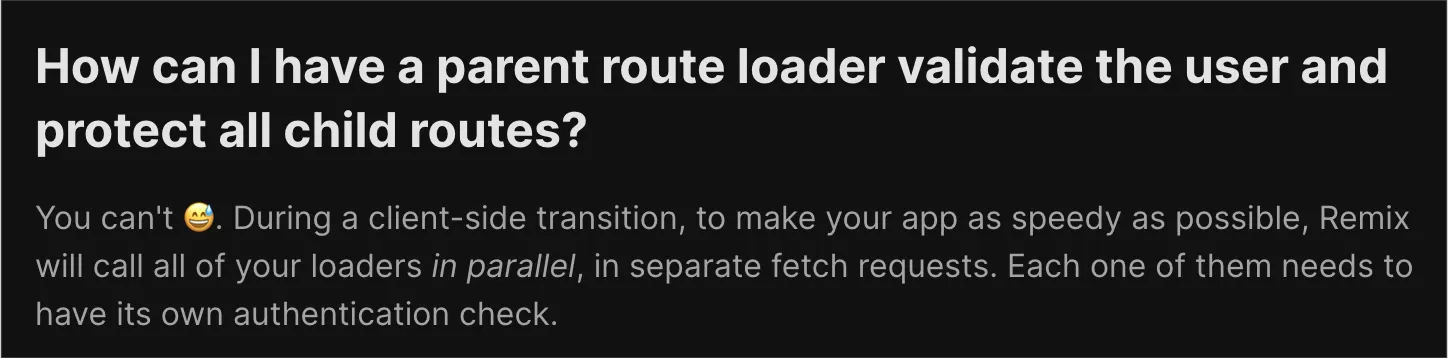 Straight from the Remix docs: parent loaders can't protect child routes, each loader needs its own authentication check.
Remix does not wait for /_protected to finish before starting /_protected.admin, it starts both at the same time. So by the time the wrapper throws its 403, the child loader has already run and already returned the secret information and the response ends up carrying both 🙂.
The answer is you do not protect the path, you protect the loader. Both guards we tried failed because they were attached to a URL, and neither holds the secret.
Remix v2 uses by default the version 6 but if you are using React Router v7 or v8, use middleware. It runs before any loader starts, so there is nothing to leak because we hit the middleware first :
If you are on Remix v2, middleware does not exist yet, so the check goes inside every loader that returns something sensitive :
Note: Remix v3 comes with middleware but the version is still in the beta version.
And that is it, so once the loader itself says no, /admin.data has nothing to return and no secret information is returned to an attacker.
As we could see, a path could have different representations, meaning a security check on a representation doesn't mean others are protected. So when you test a Remix target, do not stop at the page, and do not stop at the status code. Ask for the data, ask for a single loader, and read the body and hopefully you’ll have a bounty waiting for you.
Hope you enjoyed it and stay safe!