
Destination control
Fully controlled
Forced prefix
Fixed path
Content control
Not verified
Relaxed MIME checks
Strictly verified
Filename control
No constraint
Forced prefix
Forced suffix
Write mode
Overwrite
Append
Create-exclusive
Some of the most under-rated findings we come across during our bug bounty engagements look exactly like this:
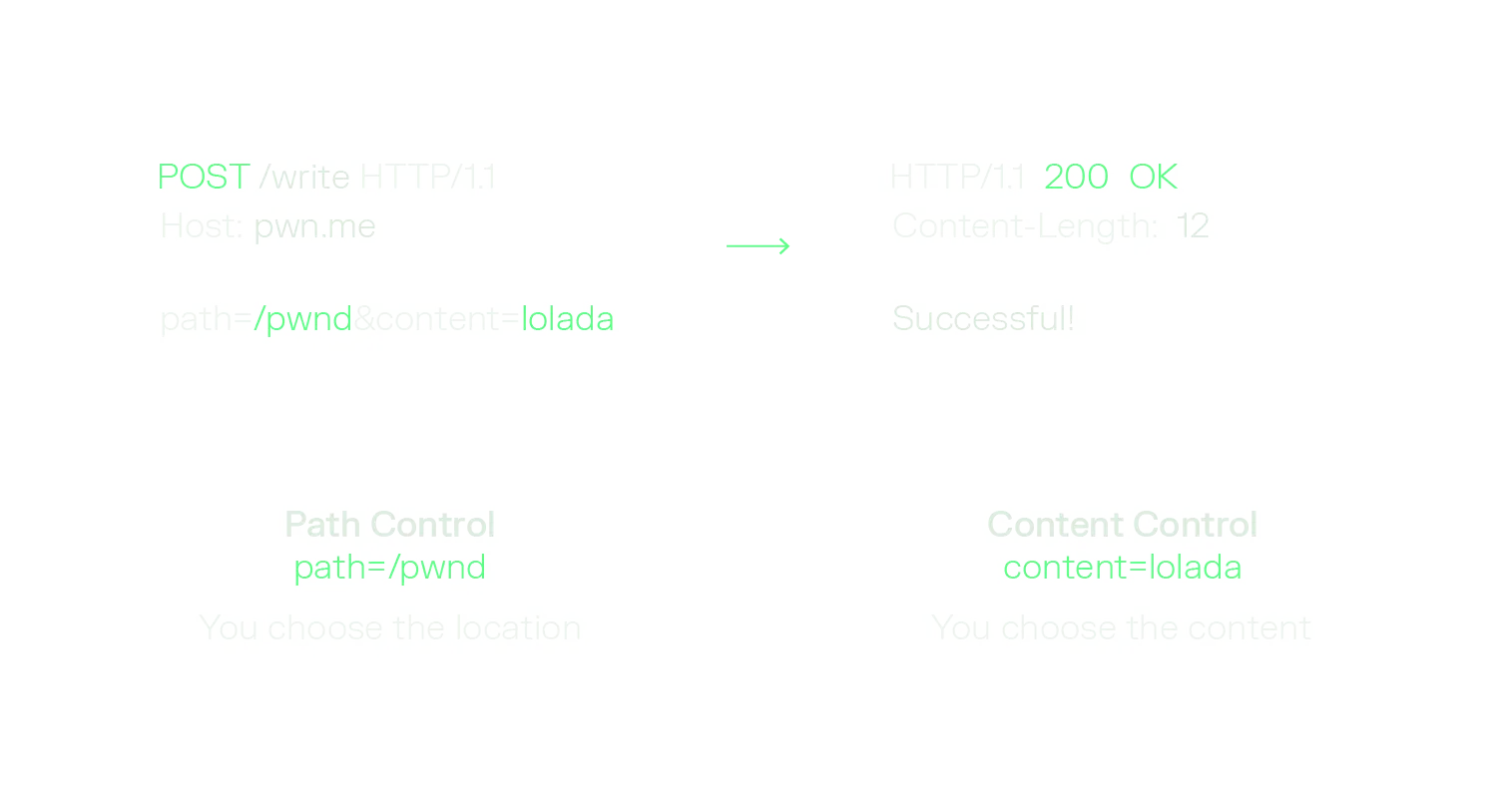
Two things are in the attacker's hands here. Path control, so you choose where the bytes land. And content control, so you choose what the bytes are. One request, write anything, anywhere.
And then comes the question that decides whether the report gets triaged as a critical or quietly closed as informative: what is the actual impact? This research was independently conducted and presented by André Baptista (@0xacb), Rafael Castilho (@Castilho) and Bruno Mendes (@s3np41k1r1t0) at Defcon Bug Bounty Village's Creator Stage.
Arbitrary file writes (AFW) have a reputation for being awkward to escalate. The write itself is trivial to demonstrate, but the jump from "I can drop a file anywhere" to "I am executing code" is where most reports go to die. The public literature is a pile of individual tricks scattered across blog posts, CTF writeups and cheatsheets, and almost all of it quietly assumes a traditional server: a shell that somebody will eventually log into, a cron daemon, a full init system, an SSH server, a package manager. A lot of what we test today looks nothing like that. It is a distroless container running a couple of processes, with no cron, no SSH, no interactive login, a mostly read-only root filesystem and a userland stripped down to the application and its runtime.
So we decided to do the boring, systematic work: catalog what actually exists, grade how useful each technique really is, and then go looking for what is missing. This blog post is the written version of our Write Once, Shell Everywhere talk we gave at Defcon 34’s Bug Bounty Village, and it comes in three parts:
Let's get started.
Every AFW-to-RCE chain we have ever written reduces to the same three ingredients:
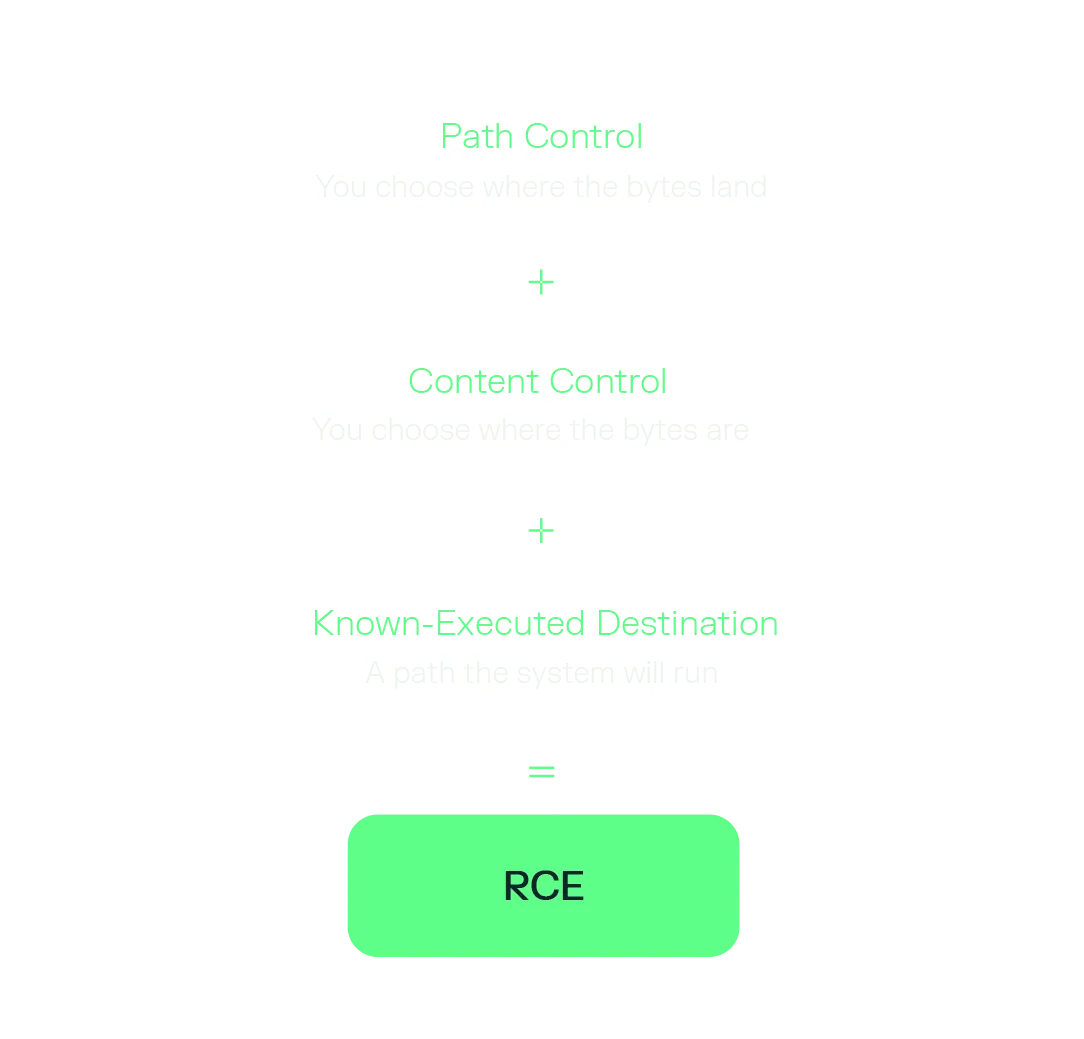
The first two terms come free with the bug. The third term is the entire game, and it is the one nobody hands you. Finding a known-executed destination means knowing something concrete about the machine on the other end: which operating system, which distro, which language runtime, which version of that runtime, whether it is containerised, and which of those paths are both writable by your process and re-read by something that will run them.
In a white box test you look this up. In a black box test you guess, and every wrong guess is a failed write against a target that is very possibly logging you.
Before hunting for a destination it is worth grading the primitive you actually have, because "arbitrary file write" covers a very wide range of quality. We found it useful to score every write along four dimensions:
A few of these deserve a comment, because they quietly kill or enable entire technique families:
Content control is the one people over-estimate. "Strictly verified" rarely means the file is safe; it usually means the file must be a valid image, or valid JSON, or valid YAML. Plenty of execution sinks are perfectly happy to run a file that also happens to parse as something else, and formats like YAML bring their own deserialisation gadgets to the party.
However, for simplicity sake, during this blog post we assume that we have a file write with the most desirable conditions.
Before adding anything new, we wanted an honest map of what already exists. The first thing that becomes obvious is that there is no single answer, because the execution context changes everything:
Each row changes which paths are executed, when they are re-read, and which user does the executing. So we split the catalog the same way: first living off the operating system, then living off the language runtime, then living off the framework.
One column in every table below is deliberately subjective. Usefulness is our own grade for how often the technique actually pays off on a modern engagement - not how clever it is, and not how well-known it is.
If you decide to live off the OS rather than the application, you immediately inherit a hard requirement: you need some kind of assurance that you are running as root, because nearly every interesting path is root-owned. Beyond that, the documented techniques split into two disappointing categories. Most of them rely on user interaction - a login, a reboot, a crash, an SSH connection - or on software that has been stripped out of cloud-native images entirely, like cron, an init system, or sshd.
The only genuinely useful and universal technique we found documented is writing /etc/ld.so.preload.
Cron is the classic answer and it is still a good one on traditional VMs, where a daemon is sitting in the background waiting to run whatever you drop. It is close to worthless on modern container workloads, which do not run a cron daemon at all.
Systemd units score badly for a practical reason: a unit file alone is not enough, you also need the symlink that systemctl enable would have created, and you need something to reload the daemon or reboot the server. Same story as cron. It’s useful against legacy infrastructure, defeated by anything cloud-native.
This is the standout of the whole OS section. /etc/ld.so.preload triggers on every new process, which means you do not need a login, a reboot, a crash or a daemon. You just need the target to execute anything at all. It does cost you a second write, since you need the shared object on disk too, which can be a problem if you are facing a load balancer that splits traffic between multiple containers.
ld.so.cache is strictly worse for our purposes: it needs the same permissions as ld.so.preload but it is a binary format, while preload is a plaintext list of paths. Given the choice, always take the plaintext one.
Every one of these targets a legacy infrastructure assumption: that a human being will eventually log in and give you your shell. Nobody will log in into a Kubernetes pod. Trust us.
authorized_keys is the nicest of the bunch, because it is the rare technique with no trigger. You supply the trigger yourself by connecting. Its weakness is the precondition: sshd has to be installed, running and reachable from where you are. Typical in traditional infrastructure, and once again defeated by cloud-native deployments.
These are elegant and they are also the first thing a container hardening baseline takes away from you. procfs is only writable by root, and inside a container it is a read-only bind mount unless somebody has explicitly configured it otherwise. If core_pattern is writable from inside your container, you have a container escape and suddenly it gets much more interesting than just another RCE report.
Moving up a layer helps, because the language runtime is present by definition. It is code that is running the application you are exploiting. The problems here are different:
.pth files are the underappreciated one. Any line in a .pth file inside a site directory that starts with import gets executed at interpreter startup, which makes it a plaintext, no-guessing-required execution sink (as long as you can write into a site directory and something starts a fresh interpreter).
PHP remains the friendliest target in this entire post, mostly because the trigger is always just the next HTTP request and you never have to wait for anything. The two config gadgets are worth distinguishing: .user.ini only works under PHP-FPM and CGI, while .htaccess needs mod_php.
OPcache scores Low for a very specific reason: to forge a file_cache entry you need to match the build ID exactly. You need an MD5 over the PHP version, the Zend extension ID and the Zend binary ID and you also need to locate the cache directory. That is a lot of guessing for something a plaintext .php file does for free.
The Bootsnap cache technique published by Conviso is the most interesting entry in this table. It targets tmp/cache/bootsnap which is commonly writable. But the cache key encodes the Ruby version, so you still need to know or brute-force which Ruby you are talking to, which was the motivation behind dedicating a whole section to explaining an oracle that turns writes into reads.
On the Node.js side, the naive version of the technique needs you to overwrite a module that has not been resolved yet, which limits it badly in a long-lived process.
Frameworks are generous, because a lot of them were designed to pick up changes on disk without a restart. Auto-reload is a feature for developers and a trigger for us.
The auto-reload behaviour depends on autoDeploy=true, which happens to be the default. The nice consequence is that these combine: overwriting a .class file on its own may not take effect, but pairing it with a touch of web.xml forces a context reload and your class gets picked up.
.NET on IIS is the best-scoring block in the catalog: four separate High-usefulness sinks, all triggering on the next request. Dropping a DLL in bin\ triggers an AppDomain restart, but you still have to either guess the name of a DLL that is actually loaded or write a web.config that references yours. This is why web.config and global.asax are the ones you should go for first.
Template engines are a great trigger and a frustrating destination. The trigger is free, because the template gets read on the next render. The problem is that most of the time you need to guess both the cache or template directory and the name of a template that will actually be rendered. Twig is the exception worth remembering, because its cache entries are plaintext PHP.
One historical note that trips people up: AllowOverride has defaulted to None since Apache 2.3.9. The .htaccess trick is still excellent when it is available, but it is no longer something you can assume. And nginx scores Low because a config write is worthless without a reload, and nginx will not reload on its own.
Step back and look at the catalog as a whole and we can remember three uncomfortable conclusions:
Guessing is expensive and it is loud. Every failed write is a request that may be logged, rate-limited, or that flips a WAF into blocking mode. Which brought us to the observation that motivated the rest of this research.
This whole section was built on an absolutely brutal paradox that has allowed us to achieve varying degrees of success: an arbitrary file write is also an arbitrary path-probe oracle, provided you can observe differences between a write that succeeded and a write that raised an error.
The reason this works is in the kernel. Path resolution walks the components left to right and stops at the first component that fails. The errno you get back leaks the existence, the type, and the writability of exactly that component. Success is not the only option (sorry Eminem). It will actually be most useful if it fails informatively.
One failed write answers three questions about a path:
Chain enough of those together and you can profile the target: OS, whether you are in a container, the container runtime, the distro, the distro version, the language and the language version. At which point the "known-executed destination" term in the RCE formula stops being so much of a guess.
These are the conditions you can deliberately provoke, and what each one tells you:
Collapsed into the only three verdicts that matter most for probing:
A verbose error message is the best case and, unfortunately, the rare one. Production targets wrap the write in a try/catch and hand you a generic error message, or in the worst case nothing at all.
That is far less fatal than it sounds. The write still executed. The exception it raised still steered the application down a different code path, and different code paths are observable from the outside. So you can stop looking for the errno directly and start using response metadata as a differential: status code, body length, latency, connection state.
The workflow is then just calibration. Let’s take the simplest example which is the status codes. You send three probes whose outcome you already know, record the signature of each, and from then you can observe the differential between them and decide how they map out.
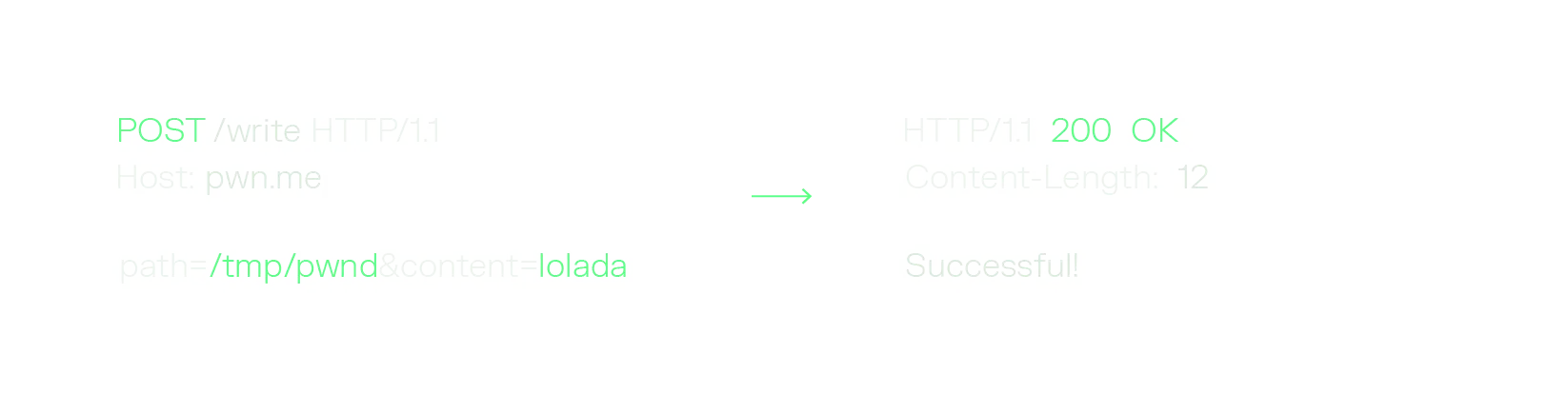
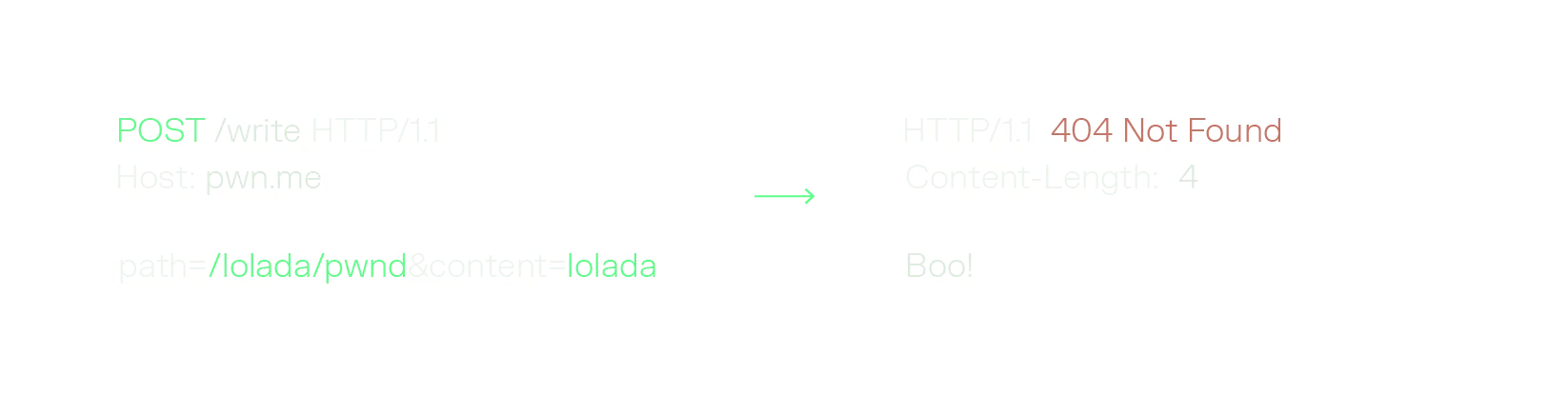
Signature: ENOENT = 404 (/lolada does not exist.)
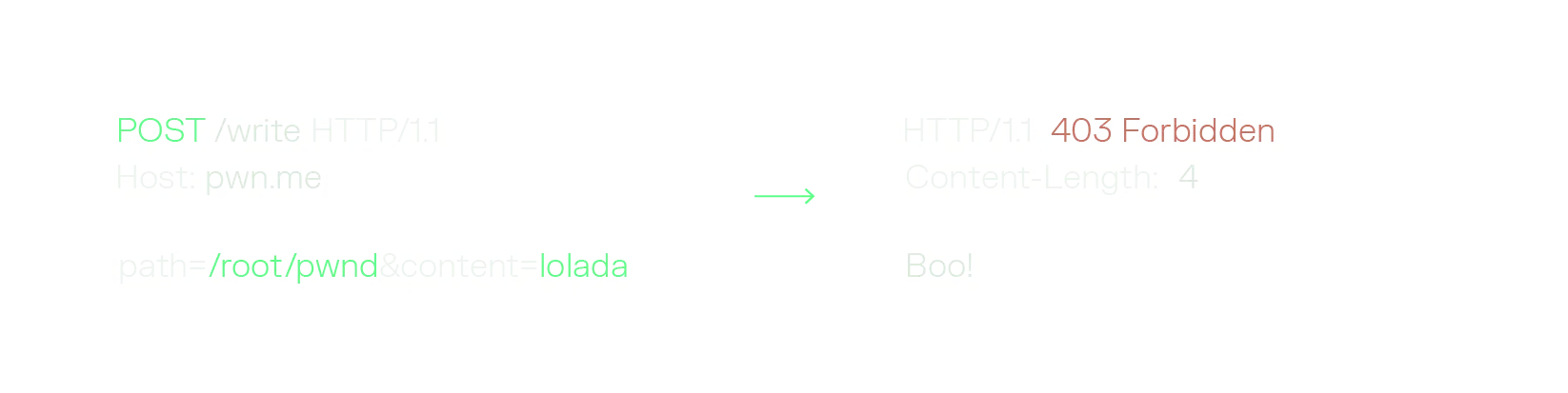
Signature: EACCES = 403 (/root exists but is not writable)
We now have signatures that match our errno and make the oracle possible: 200 means writable, 404 means the path does not exist, 403 means it exists but is locked. Every probe from here on is a lookup against the signatures you just recorded.
With a working oracle, fingerprinting becomes an ordered decision tree. Each layer narrows the search space for the next, so you spend the fewest probes possible.
Let’s see this methodology in action below!
The OS-family probe is our favourite, because it needs no knowledge of the filesystem layout whatsoever. Ask for a 200-character UTF-16 filename: Linux filesystems cap a single filename component at 255 bytes, so a name that is comfortably legal on Windows blows past the limit and comes back as ENAMETOOLONG.
The last row is the one that matters most in practice. /lib/modules and /run/systemd/system both being absent tells you that you are inside a stripped container. Which means you can stop wasting requests on the entire cron, systemd, SSH and login half of the catalog before you have sent a single malicious payload at them.
The nicest thing we found while building this out is how many runtimes encode their exact version in a directory name. A directory name is exactly what an existence oracle is good at reading.
Two of these are worth calling out. The /usr/lib/php/YYYYMMDD directory is named after the Zend API date, which maps one-to-one onto a PHP minor version and is compiled into the binary. Therefore, a couple probes gives you the exact PHP minor, which is exactly the input the OPcache technique was missing. And the version manager paths are gold, because ~/.rbenv/versions/X.Y.Z hands you the full patch version of the runtime independently of whatever the base image claims. That is the guess the Bootsnap technique needed.
This list is incomplete but it is rather easy to spin the most default docker images for the different languages and frameworks and start looking for these patterns in there. You go get them!
Put together, a handful of probes gets you a complete profile:
Profile: Linux · Ubuntu 24.04 · aarch64 · glibc · stripped Docker · Python 3.12.
Six benign probes. No guessing. And crucially, the profile tells you which half of the catalog to throw away: stripped container means cron, systemd, SSH and login triggers are all dead, and Python 3.12 on Ubuntu 24.04 tells you exactly where site-packages lives.
In this section we will present a handful of techniques that have been helpful for us during our research to achieve RCE without having to guess anything too major other than the technologies that are being used by the target.
Fingerprinting removes the guessing. The next question we asked was whether there is a destination that needs no fingerprinting at all.
There is, and it comes from a detail of how shells read their own scripts. Bash and dash keep the script open and read it lazily, rather than slurping the whole file into memory. That means the script is held on a file descriptor for the entire lifetime of the process. And because the shell exposes low-numbered descriptors to the script itself, it has to move its own bookkeeping out of the way. Bash's manual is explicit that file descriptors greater than 9 "may conflict with descriptors the shell uses internally", so the interpreter relocates the script descriptor up out of reach:
The result is a stable, predictable handle to the running script on the filesystem: /proc/<pid>/fd/255 or /proc/<pid>/fd/10. And for a container entrypoint, that pid is 1.
Because the shell re-reads the script on demand, writing through that descriptor rewrites the program that is currently running.
Compare that to everything else in this post. In a typical AFW-to-RCE chain you have to guess:
A container with a bash or dash entrypoint always gives you one thing for free: PID 1 is a live shell, and its script is reachable at a fixed descripto. You never have to learn the script's path, because you never need it.
The mechanism is easiest to see under strace. Watch the shell read one command, run it, then seek back to pick up the next one:
That blocking sleep 30 is the whole exploit window. The shell has already committed to re-reading from offset 36, but it has not read it yet. Whatever bytes are at offset 36 when it comes back are the bytes that get executed.
The preconditions are rather short:
And the payload:
That newline flood is the true art of the deal. You do not know the exact offset the shell will resume reading from, and you do not need to: pad with enough newlines that wherever the cursor lands it walks harmlessly forward into your command. It is a NOP sled, in bash.
Here is the shape of a real target, where we found this to be the most desirable target for this gadget. A Kubernetes Job runs a pod whose entrypoint is /app/run.sh, so PID 1 is sh and the script is held on fd 10. Inside that script, a file parser processes untrusted input, and the parser is where the arbitrary file write lives.
The four steps:
The second technique targets Rails, and it is a nice counterpoint because it works through a data file rather than a script.
db/schema_cache.yml is a snapshot of your database structure that Rails loads on boot to eliminate slow, repetitive database metadata queries. It is a performance optimization, it lives in a directory that is frequently writable, and Rails loads it with YAML.unsafe_load.
Unsafe YAML loading means the document is not restricted to plain data. It is allowed to construct arbitrary Ruby objects, which turns a file write into a deserialization gadget hunt. The chain we land on was the following:
Walking that through: the payload declares a Gem::Requirement as a Hash key, using YAML's explicit-key syntax. Ruby cannot insert an object into a Hash without hashing it, so it calls Gem::Requirement#hash for us . The attacker-controlled requirement causes Lockfile#to_s to run, the Lockfile asks a malicious StubSpecification for its specification, and that calls Gem::Specification.load with a path we chose. RubyGems reads that file and evaluates it as Ruby.
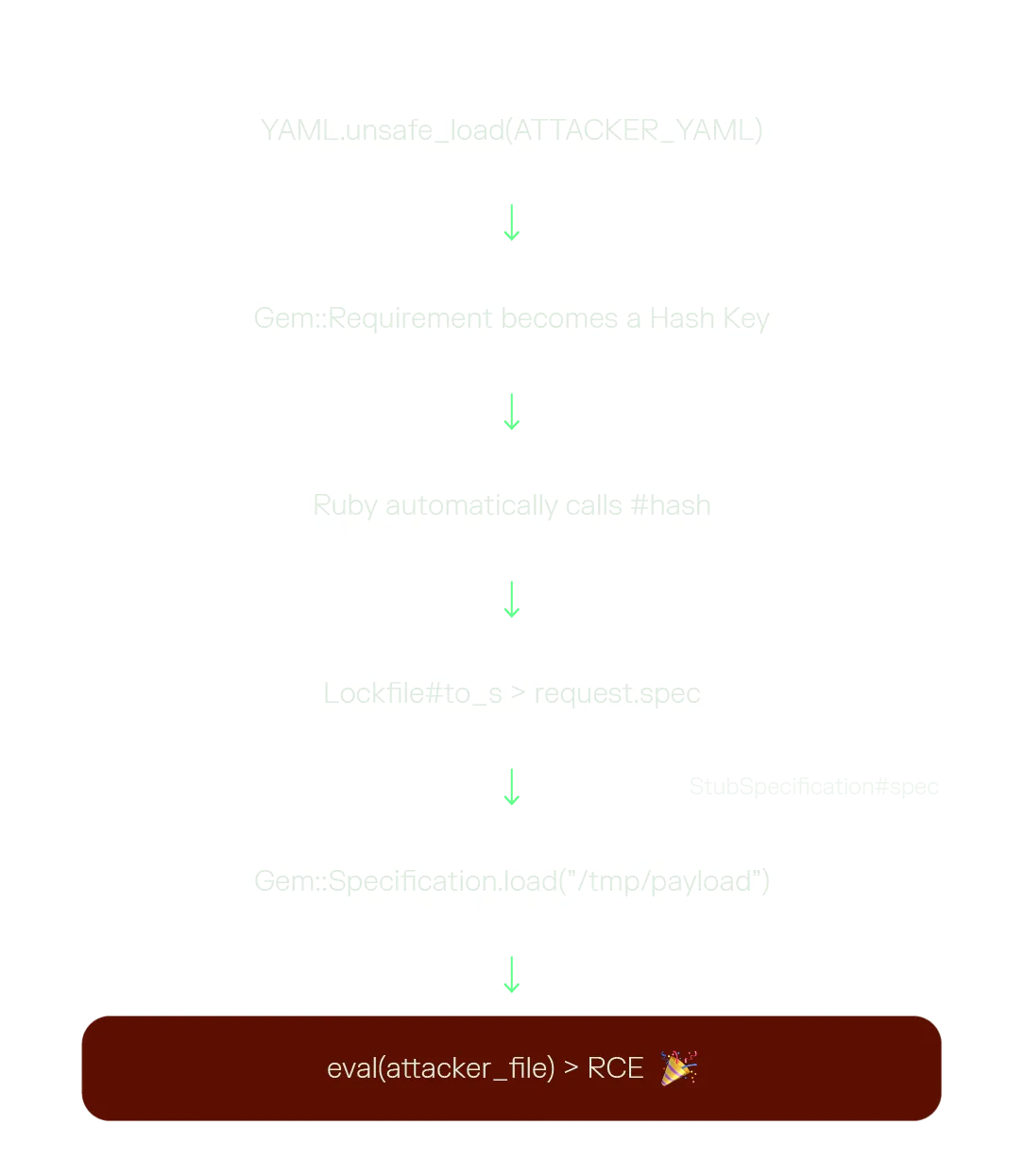
Rails does eventually complain, because the result of the load is not a real SchemaCache but the complaint comes after the eval. Execution has already happened by the time the error surfaces, which is a pattern worth internalizing: an application error in the response is not evidence that your payload failed.
Note that this needs two writes: the YAML file and the Ruby file it points at. This is fine, since a write primitive you can use once you can usually use twice.
Earlier in the catalog we graded the obvious Node.js technique (overwrite node_modules/<module>/index.js) as mid, and the reason is the require cache. Once a module has been resolved and loaded, Node never reads it from disk again, so overwriting it does nothing to a process that is already running.
Workers do not have that problem. Node applications spawn new workers all the time, as a completely normal part of its operation. Each new worker loads its code from disk. So the question becomes obvious: what if we overwrite the worker.js?
This is what makes it a minimal-guessing technique rather than another entry in the catalog. Worker pool libraries resolve the worker entrypoint relative to their own installation directory. Here is how Piscina is doing exactly that:
Because the path is anchored to the library's own __dirname, it is fixed by the library's layout, not the application's. You do not need to know the app's directory structure, its module names, its entrypoint, or anything else about how it was written. You only need to know which pool library is sitting in node_modules.
These are the ones we mapped:
Two of those have two paths each, for the same reason. Tinypool supports both worker threads and child processes, and jest-worker defaults to child processes but can be configured to use worker threads. Rather than fingerprint which mode is in play, just overwrite both files and cover either one.
The exploitation flow is four steps:
The preconditions are short and, in practice, common:
That third precondition is the one worth dwelling on. Every other Node technique in this post needs the process to restart, which means you need a crash and a supervisor process to restart the application. Here you need the pool to do the thing it was installed to do. On a busy application you do not have to trigger anything at all. You just overwrite the file and wait for it to run your code for you.
If there is one thing to take away, it is that the severity of an AFW is a function of how much you know about the target, not of the primitive itself. The same bug is a low-impact file drop against an opaque black box and a root shell against a machine you have profiled. The gap between those two outcomes is reconnaissance, and reconnaissance is something you can automate. We hope that we are unveiling the veal to something much bigger that can be extended to all the execution contexts a reader may imagine.
The mitigations that actually move the needle here are unglamorous:
Hope you enjoyed it, see you next time space cowboy!
Get curated content on ethical hacking, innovation, and what’s next in cybersecurity
[1] Conviso Research Team, From Arbitrary File Write to RCE in Restricted Rails apps - https://blog.convisoappsec.com/from-arbitrary-file-write-to-rce-in-restricted-rails-apps/
[2] Vulnerable app and exploit for the Bootsnap technique - https://github.com/convisolabs/rails_arb_file_write_bootsnap
[3] GNU Bash Reference Manual, Redirections (on file descriptors above 9) - https://www.gnu.org/software/bash/manual/bash.html
[4] path_resolution(7) - https://man7.org/linux/man-pages/man7/path_resolution.7.html
[5] errno(3) - https://man7.org/linux/man-pages/man3/errno.3.html
[6] open(2) - https://man7.org/linux/man-pages/man2/open.2.html
[7] Bootsnap - https://github.com/rails/bootsnap