Internal network security testing has always been a hard problem from a logistics standpoint. The target is, by definition, not reachable from the internet. You need something inside the perimeter that can bridge the gap. That is what the Ethiack Beacon does: it creates a secure tunnel between the Ethiack Hackian Engine and your internal networks so we can run the same assessments we run against your public-facing attack surface on everything behind the firewall.
We shipped the first version of the beacon a couple of years ago and we got real feedback on what worked and what could be improved. This year we rewrote it entirely. This post explains what we built, why we made the decisions we did, and how the two versions compare architecturally.
How V1 Worked
The first beacon was a Docker container running a WireGuard server.
The model was straightforward: we generated a WireGuard configuration for the customer, they unzipped it onto a VM, ran start.sh, and the container came up with WireGuard listening on a UDP port. The Ethiack infrastructure would then connect to that port as a WireGuard peer and get access to whatever internal subnets were configured.
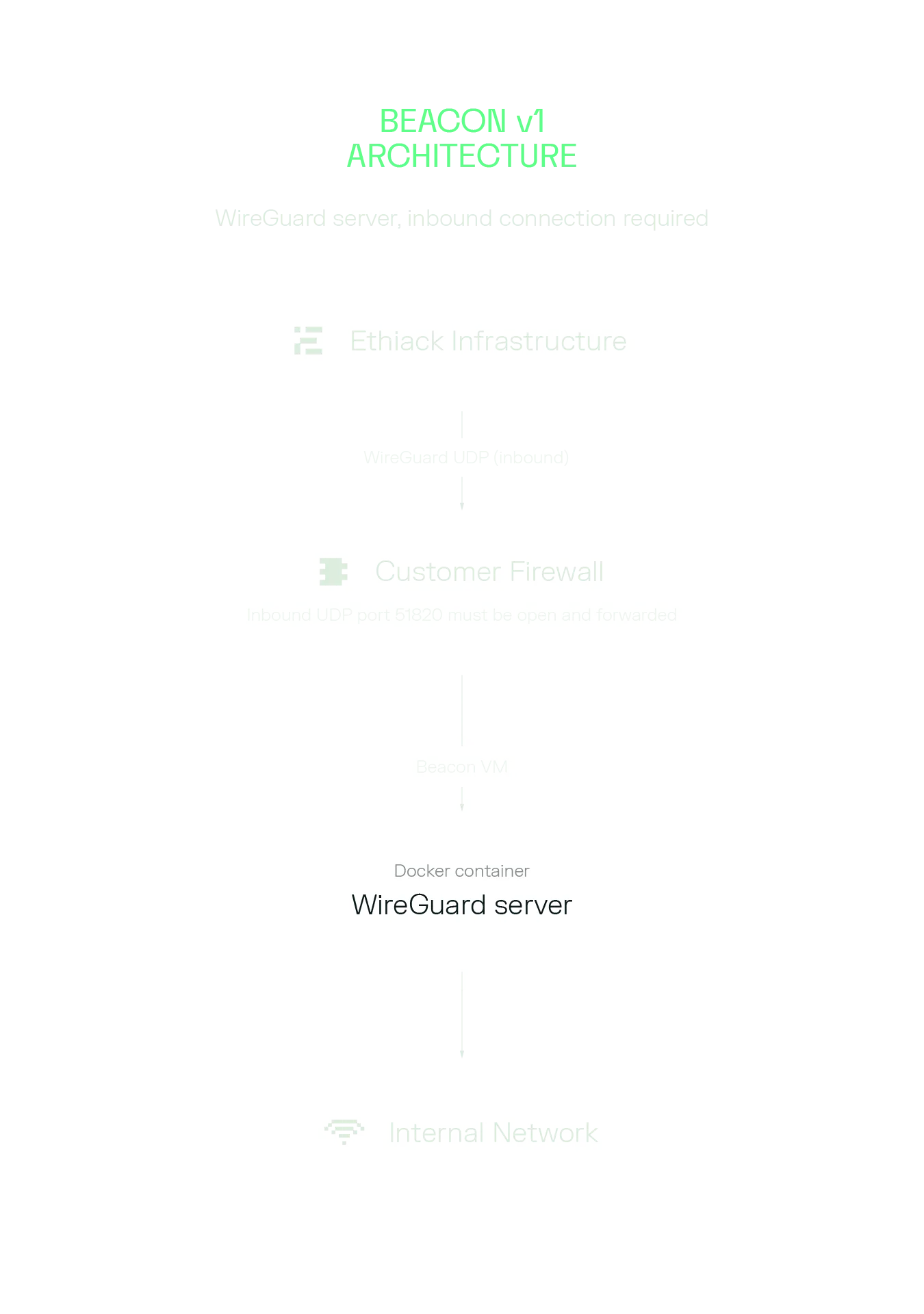 Beacon V1 Architecture
Beacon V1 Architecture
One of the main problems we faced with this model was the firewall. For the Ethiack engine to reach the WireGuard server, the UDP port had to be open and forwarded from the internet to the beacon VM. This was the single biggest source of friction in onboarding. Security teams are understandably reluctant to open inbound ports. Network engineers needed to be involved. Cloud security group rules had to be modified. We tried to overcome this with a checker script to verify the port was reachable, but even with it a significant portion of support conversations were about that exact step.
Beyond the firewall issue, V1 had other rough edges:
- Configuration was a static ZIP file. Any change to network scope, CIDR ranges, or beacon parameters meant deleting the beacon and recreating it from scratch.
- There was no automatic CIDR detection. The customer had to know exactly which IPs they wanted to test and enter them manually in the portal.
- Internal IP discovery did not exist. Assets had to be added by hand, one by one, or by wildcard if the customer had an internal DNS server configured.
- The health reporting was a cron job running inside the container every few minutes. It was blunt and gave us limited visibility into what was actually happening with the tunnel.
- It was Docker-only. No native install, no Kubernetes support, no Helm charts, no Ansible playbooks.
The V1 beacon was a proof of concept that allowed us to start to bridge the gap to internal networks. With that in place we used that experience to learn what needed improvement.
The Core Problem We Solved in V2
The root issue with V1 was the direction of the connection. We were asking customers to accept inbound connections from the internet. That is something that will frequently cause friction. Network policy, security controls, and common sense all push against opening inbound ports.
The fix is to flip the model. Instead of Ethiack connecting inbound to the beacon, the beacon connects outbound to Ethiack. Outbound connections are almost universally allowed. HTTPS on port 443 goes out from every corporate network without anyone batting an eye.
To do this cleanly, the beacon runs a lightweight reverse tunnel client that establishes a persistent outbound connection to our infrastructure. That connection is then used to forward the WireGuard UDP traffic back to the beacon. The WireGuard role also flips: V1 ran a WireGuard server on the customer side, with Ethiack connecting in as a peer; V2 runs a WireGuard server on the beacon and WireGuard clients on the Ethiack side, with traffic delivered via the reverse tunnel.
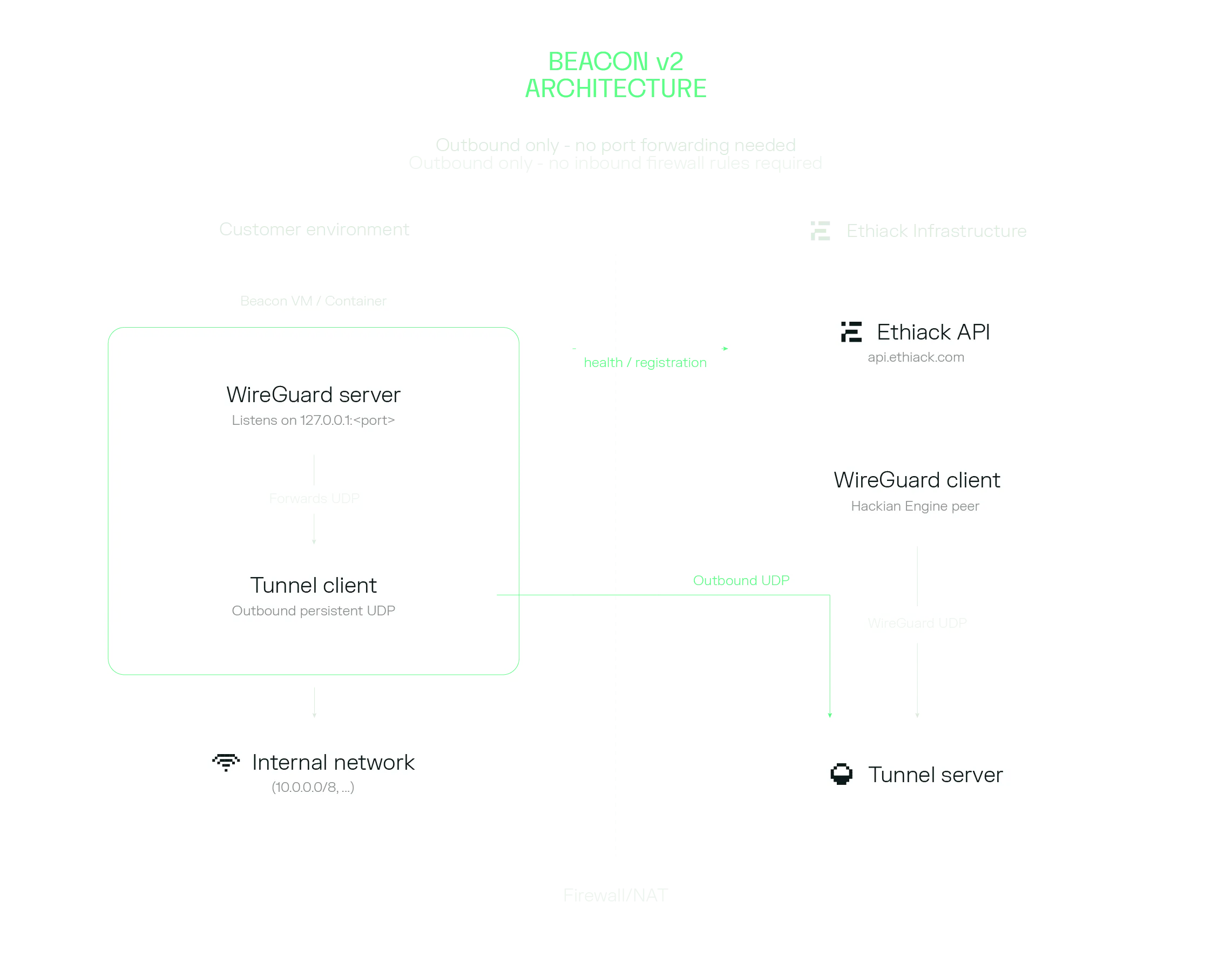 Beacon V2 Architecture
Beacon V2 Architecture
The customer’s firewall does not need to change at all. No inbound rules. No port forwarding. The only requirement is outbound HTTPS to our API and outbound UDP to our tunnel endpoint, which is something already available in every corporate network.
Architecture of the V2 Beacon
The V2 beacon is a Python CLI package (ethiack-beacon) with a modular architecture that manages five things: the WireGuard tunnel, the reverse tunnel, a local DNS forwarder, health reporting, and local state.
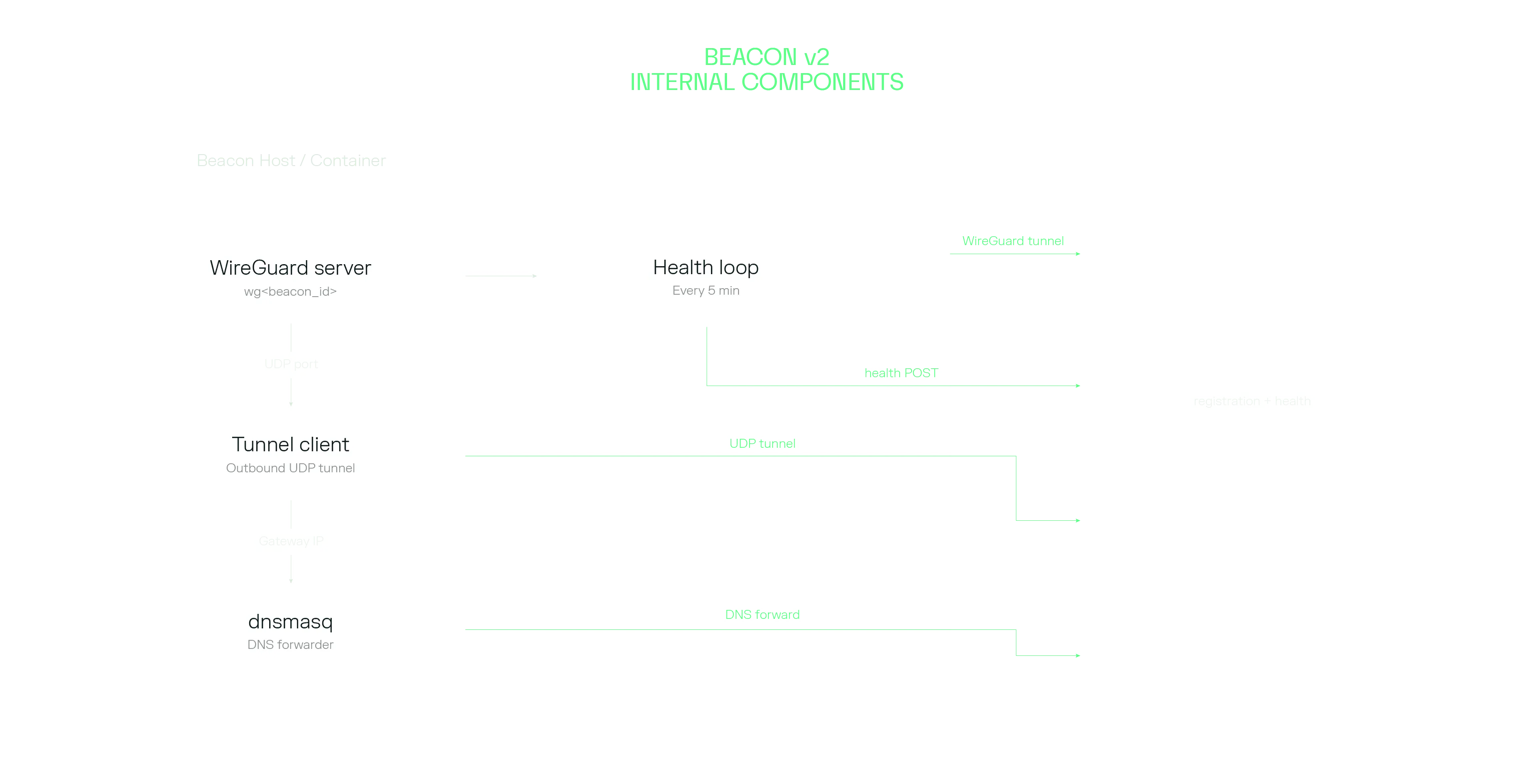 Beacon V2 Internal Components
WireGuard
When you run beacon create, the CLI calls our API to register the beacon. The API returns a complete WireGuard server configuration: private key, peer public key, allowed ranges, and never stores the private key. The CLI writes that config, injects the correct ListenPort (so the tunnel layer knows where to forward traffic), and adds masquerading rules, and runs wg-quick up.
Reverse Tunnel
After WireGuard is up, the CLI configures and starts the reverse tunnel as a background process. The tunnel binary is pre-bundled in the Docker image and auto-downloaded on native installs (platform and architecture aware: x86_64 and arm64, glibc and musl).
The tunnel client keeps a persistent outbound UDP connection to our infrastructure and forwards the WireGuard UDP traffic through it. From the Ethiack engine’s perspective, there is a stable WireGuard server it can connect to and use for scanning. The customer’s NAT and firewall are completely transparent to this.
DNS Forwarding
This one turned out to be subtle. When WireGuard modifies the routing table, it can break DNS resolution on the beacon host because the newly routed traffic may no longer reach the host’s configured nameservers. We solved this by starting a per-beacon dnsmasq instance that listens on the WireGuard gateway IP and forwards queries to those captured upstreams.
Health Reporting
Instead of a cron job, V2 runs a continuous health loop (beacon health) that checks every 5 minutes if the connection is healthy. It verifies that the WireGuard interface is up, the tunnel process is alive, and the tunnel logs do not contain recent error lines. The results go to our API, giving us much more signal about what is actually happening versus the coarse “online/offline” we got from the V1.
In Docker deployments, beacon health is the container’s main process, which means Docker restarts it automatically on failure and you can read structured logs from docker logs.
CIDR Detection and Scope
One of the bigger UX improvements is automatic CIDR detection. The CLI inspects the host’s network interfaces, filters for RFC 1918 and CGNAT ranges, and suggests the subnets to expose. On a typical corporate VM you get a reasonable starting point without having to know your subnet masks off the top of your head.
For cases where the host has many interfaces (Docker bridge networks, VPN tunnels, overlay networks), you can set ETHIACK_BEACON_CIDRS explicitly to avoid picking up unintended ranges. The two modes are: detect everything and let me review it, or specify exactly what I want.
Once a beacon is active, the Ethiack engine automatically discovers reachable hosts within the exposed CIDRs. You no longer need to add internal assets manually one by one.
Deployment Options
V1 had one deployment option: Docker Compose with a ZIP file that needed to be manually uploaded to a VM.
V2 ships four deployment methods and also supports running natively without Docker at all:
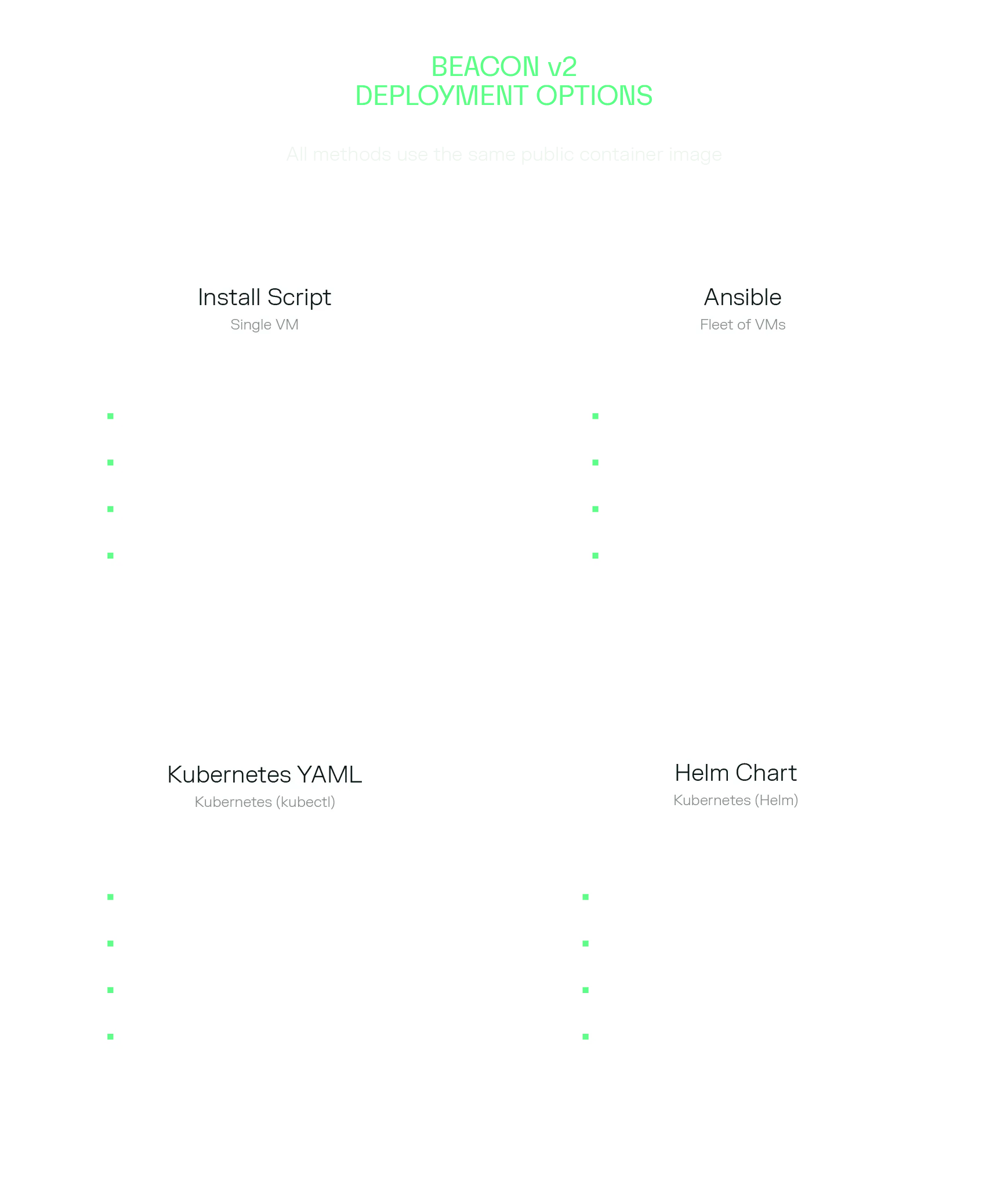 Deployment Options
Deployment Options
- Install script (single VM): The script detects whether Docker is available and selects Docker or native mode accordingly. In native mode it installs WireGuard, dnsmasq, and the CLI via uv, then configures a systemd service. In Docker mode it pulls our public image and sets up docker-compose as a service. Either way the beacon registers, starts, and comes up as Active with a single command.
- Ansible: for teams managing fleets of Linux VMs. The Ansible role handles one non-obvious problem: CIDR detection. When the beacon runs in Docker, the container cannot see the host’s network interfaces, so auto-detection would pick up Docker bridge ranges rather than real internal subnets. The role solves this by running a Python snippet on the host before starting the container to detect RFC 1918 ranges on the real interfaces, then passing the result as ETHIACK_BEACON_CIDRS to the container.
- Kubernetes YAML and Helm: for Kubernetes environments. The only cluster requirement is the NET_ADMIN and SYS_MODULE Linux capabilities for the container, which WireGuard needs to configure the network interface.
A few Kubernetes-specific details worth knowing: the deployment uses Recreate rather than RollingUpdate. This is intentional: WireGuard binds a named network interface, and if you try to start a new pod before the old one terminates you get a conflict on that interface. Recreate guarantees the old pod is gone before the new one starts.
The deployment also includes a preStop lifecycle hook that reads the beacon’s state file, extracts the beacon ID, and calls beacon delete before the pod shuts down. This keeps the portal in sync with reality when pods are evicted or restarted rather than leaving ghost beacons behind.
All deployment templates are in the public ethiack/beacon-deployments repository.
For fully automated (non-interactive) deployments, every parameter can be driven by environment variables:
This makes the beacon trivial to deploy via CI/CD, Ansible, or cloud init scripts.
Side-by-Side Comparison
Connection direction
Inbound (WireGuard server on customer, clients on Ethiack)
Outbound (WireGuard server on customer, clients on Ethiack, via reverse tunnel)
Firewall requirement
Open inbound UDP port, publicly reachable
Outbound HTTPS + outbound UDP only
Deployment options
Docker Compose + ZIP file
Native, Docker, Kubernetes, Helm, Ansible
Configuration
Static ZIP file
API-generated, CLI-driven
CIDR detection
Manual
Automatic (with manual override)
Asset discovery
Manual, one-by-one
Automatic after beacon is active
Multi-beacon on same host
No
Yes
Health reporting
Cron job (Online/Offline)
Continuous (5-min intervals with detailed health information)
DNS forwarding
Manual config
Automatic via dnsmasq
Editing beacon config
Delete and recreate
CLI or Portal
A Note on Performance
The reverse tunnel adds one hop to the path: WireGuard traffic goes through our tunnel server. In practice, we have not seen this be a bottleneck for the workloads the beacon supports. The bottleneck in typical beacon deployments is the network within the customer environment, not the tunnel and that does not change in this new version.
The tunnel component is extremely lightweight, uses low CPU resources and scales well under load.
Final Notes
We are confident that the new beacon version solves a real operational problem that was blocking some customers from using internal testing at all. If you have been putting off setting up internal coverage because of the firewall complexity, the new setup takes only a couple of minutes. If you are interested about pentesting from Cloud to local networks, reach out to our customer success team at support.ethiack.com and learn how you can get access to this feature.
Ethiack's
Blog
Get curated content on ethical hacking, innovation, and what’s next in cybersecurity