
Passing secrets around embedded directly in URLs is not today’s news. Session tokens, magic links, redemption codes, and user identifiers have had a certain tendency to appear in query strings for years.
Usually, the risk is straightforward: URLs eventually end up in all kinds of unwanted places like logs, browser history, analytics platforms, screenshots, and so on. This becomes an issue because these mechanisms were not built to deal with sensitive data and, therefore, are not as well protected as they should (for usability reasons of course 😉).
Researchers have proved that in the past it is possible to abuse browsers and recover URLs that should have not been recoverable. We will focus on the art of stopping browser-side redirects on this blog post.
Jorian wrote an incredible piece on how to stop redirects, exploring several browser behaviours that can interrupt navigation flows and, combined with an XSS, would allow attackers to leak secrets from callback URLs in OAuth flows.
Even myself, before joining Ethiack, wrote a piece in which I used 431 and 414 status codes in order to stop a redirect chain and leak URLs containing token sessions. You should take a look at it here, since it demonstrates the building blocks for this research.
Practically speaking, the most common types of impactful vulnerabilities that involve URLs and client/server side redirects need some kind of redirect parameter containing an URL to which the browser will be redirected to. At that point, we enter familiar territory involving open redirects and secret leakage.
However, since this has been a common topic for so long, applications are becoming increasingly hardened against accepting an URL with an arbitrary origin. Instead we will focus on applications that only accept a path instead of a full URL.
At first glance, this looks much safer:
- No external domain
- No obvious open redirect
- No easy way to redirect users elsewhere
So I started wondering: what can an attacker still do when they only control the path of an URL?
This question led me into discovering an interesting quirk between server-side redirects and browser navigation behavior, allowing me to abuse Google Chrome’s ERR_TOO_MANY_REDIRECTS error page to stop the redirect chain, thus stealing potential secrets.
Let’s get started!
URL for Dummies: Path and Fragment quirks for the uninformed reader
As you should know, an URL (Uniform Resource Locator) is the full address of literally anything on the web. You can think of it as a postal address, but for a webpage, an image, an API endpoint or anything else that can be served over the wire.
https://example.com/login/settings#section-2
In web applications, every URL has a path. It’s informally defined as the part after the domain that points to a specific resource and that path, by itself, can be interpreted in two ways:
- Absolute Path - /oauth/callback points to a specific endpoint
- Relative Path - ../oauth/callback is relative to the current URL path
In practice, if the current URL of your browser is https://example.com/login/, by appending the following paths you get the results on the right:
URL + /oauth/callback → https://example.com/oauth/callback
URL + ../oauth/callback → https://example.com/oauth/callback
Even though the path is not the same, they land in the same place. However, if you start messing around with the path structure of the original URL change they may start to diverge.
Did you notice that # at the end the URL in the first example of this section? That's called a fragment and it behaves in a unique way.
According to the WHATWG URL Standard, a valid URL string can also be a relative URL or an absolute URL with a fragment.
A valid URL string must be either a relative-URL-with-fragment or an absolute-URL-with-fragment string
However, the fragment is never sent to the server. That’s because the fragment is only interpreted by the browser, the server never receives the fragment creating a discrepancy between the two. This blog post explores how we can abuse this quirk to stop a redirect chain.
An Innocent Looking Application
I made a flask app specifically to demonstrate the quirk I’m gonna talk about over the next sections.
If you take a look at the code it is not hard to identify the patterns that we have been describing so far. Particularly, the /share_redirect endpoint calls the is_valid_path that restricts redirects only to paths. This is how the flow between the browser and the server plays out:
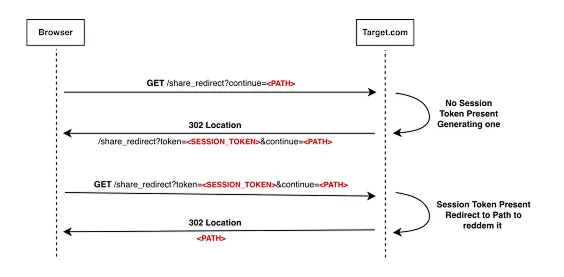
1-The Browser makes a request to /share_redirect with the Path that redeems the session token being tossed.
2-No session token is present in the URL, therefore, a session token is generated, placed on the URL.
3-The server responds with a 302, leading the Browser to make another request to the server (now including the session token in the URL).
4-With the session token present in the URL, the Browser finally gets redirected to the final destination, after successfully redeeming the token.
It’s a pretty simple and straightforward redirect chain. The attacker only controls the path in the continue parameter. Naturally, the secret session token gets redeemed at the end of the redirect chain in the target.com origin.
So… what could go wrong?
The Browser-Side Redirection Quirk
Let us consider this URL:
https://example.com/share_redirect?token=SECRET&url=%23x
Naturally, the server will return a 302 response with a Location: #x header. On the browser side of things, the URL will now become:
https://example.com/share_redirect?token=SECRET&url=%23x#x
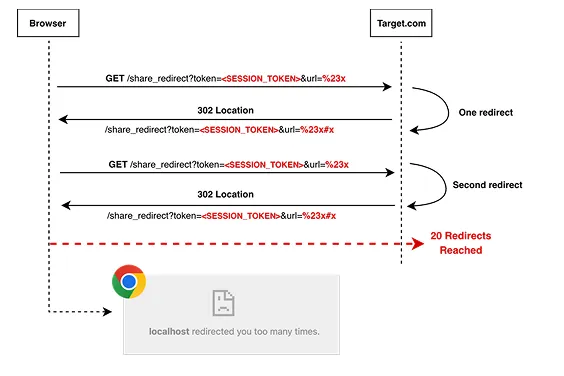
The browser is forced to make another request. However, this is what the server will receive:
GET /share_redirect?token=SECRET&url=%23x HTTP/1.1
We just made a way to replay exactly the same requests and enter a redirect loop. You can guess where this is going…
Specifically, the key difference is:
- Browser-Side URL: /share_redirect?token=SECRET&url=%23x#x
- Server-Side URL: /share_redirect?token=SECRET&url=%23x
Chrome resolves the Browser-side URL to /share_redirect?token=SECRET&url=%23x#x, but in the next HTTP request it strips the fragment and sends /share_redirect?token=SECRET&url=%23x again. The server sees the exact same request, returns Location: #x again, and the cycle repeats.
The loop happens because Location: #x only changes the browser-visible URL. It does not change the URL that the server receives.
Google Chrome has a limit of 20 redirects. Joining that fact with this quirk causes the browser to throw around the URL containing the session token back and forth until the limit is reached. This eventually causes an ERR_TOO_MANY_REDIRECTS which will land in a Chrome Error page containing the session token that never got redeemed at the end of the chain.
Exfiltrating the Session Token for the Win
Imagine that we already have JavaScript execution on the target origin.
At this point, the attacker does not need to read a cross-origin page. The problem is that after Chrome reaches ERR_TOO_MANY_REDIRECTS, the iframe is no longer showing a normal application page. It is showing a browser-generated error page that does not have the same origin as the aforementioned page.
That error page is controlled by Chrome, so the attacker cannot directly read its contents. However, if we navigate the iframe back to a readable same-origin page, we can inspect its Navigation API entries and recover the URL that caused the redirect error.
Conclusion
The main lesson that we learned today is that “relative redirect” does not always mean “safe redirect”. A fragment like #x does not change the URL origin, but the browser and server will handle it differently: the browser adds the fragment, while the server never receives it. This can make the server see the same URL repeatedly and Chrome eventually stops with a ERR_TOO_MANY_REDIRECTS.
Developers should avoid placing sensitive tokens in URLs at all costs and redirects parameters that can be controlled by an user should be strictly allowlisted.
Hope you enjoyed it, stay safe!